Choose the outcome you need.
See the route before you begin.
Find trusted data
Find the data behind a business question and see why it can be trusted.
Start from the business question
Begin with the business question and choose the Workspace source that should hold the answer. Storage detail comes later.
Prepare your review
Continuing from this guide opens your Workspace's Connect data page, where you connect a source or open one you already have. Nothing is read until you test or capture it. The Find trusted data starter template stays on Home: starting it creates only a folder, inert Canvas draft, and Solution Brief, and does not contact a provider, create a Connection, inspect rows, move data, or establish trust.
Discover sources I can connect
Template version 2 lists governed Connections visible with your current Workspace rights. Mail, cloud and local labels are suggestions, not discovered accounts or files. An Editor can select one readable table-scoped SQL Server Connection and a business question. Selection makes no provider call. Explicit Capture reads bounded rows into a retained Dataset Revision and Representation, attaches Objective evidence to the Canvas, and reopens the exact result from Recent work. A changed or revoked Connection blocks another capture. Classification pending and Objective Unknown still need review before a trust claim.
Choose one source
Open the approach, choose one readable File or source, then confirm 'Preserve and verify'. Edit is required; otherwise show honest unavailability. A listing or declared connector is not observed access.
Inspect what you own
The exact source becomes a Dataset Revision and Representation. An Objective Manifest and Objective Receipt can be reopened, while source custody remains its own; the guide and Agent receive references, not rows.
Read the evidence
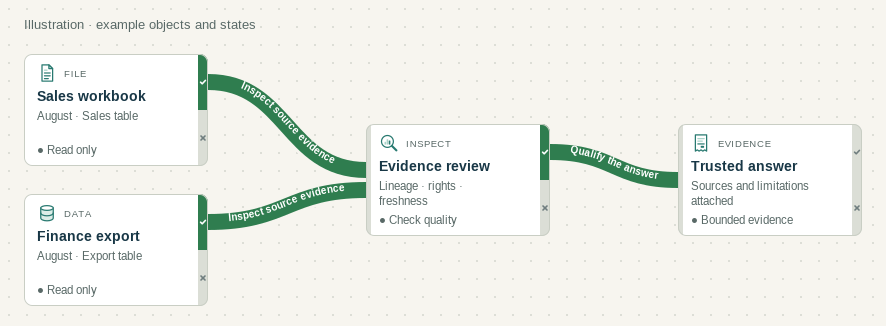
Independently check lineage, rights, freshness, and quality, then reread the Receipt. Unavailable evidence stays unavailable, and an unobserved lifecycle remains unproven.
Recover without guessing
Upload a missing File, ask an Owner for rights, refresh stale or incomplete evidence, and retain the connector's one-source and one-mode limit.

Inspect diagram labels
Already know what you need?
Explore individual capabilities and work directly with your data.